Plumbing Job Costing: Track Parts, Labor and Profit
I ask every plumbing client the same question at our first meeting: which of your jobs makes you the most money? Almost everyone answers confidently. And about half the time, the job cost sheets we put together over the next couple of months say something different.
That’s not a criticism. When you’re running calls all day, revenue is easy to see and costs are scattered across supply house receipts, time cards and a gas card. Job costing just puts them back together, one job at a time.
Short answer: give every job a name, record its parts, labor at your loaded rate, subs, permits and disposal against it, and subtract from the price. That’s gross profit per job. Compare it with the estimate when the job closes, and look at the pattern by job type once a month.
What does job costing actually tell you?
Which jobs pay, and which estimates are wrong. A single number for the month, revenue minus costs, tells you whether the business made money. Job costing tells you why.
The University of Nebraska Omaha’s small business development center puts it simply: “Using a job costing system, a project manager or accountant tracks the true cost of each job” (Nebraska Business Development Center). The payoff is in the comparison. If your water heater installs keep beating the estimate and your slab leak jobs keep missing it, you know exactly which price to fix.
What goes on a job cost sheet?
Everything you paid because this job happened, and nothing you’d have paid anyway. Here’s a water heater replacement, with example numbers:
| Line | Estimate | Actual |
|---|---|---|
| Price to customer | $2,400 | $2,400 |
| Water heater, fittings, expansion tank, venting | $1,050 | $1,120 |
| Labor: 2 techs, 3.0 hrs est. / 3.5 hrs actual, at $48 loaded | $288 | $336 |
| Permit | $95 | $95 |
| Haul-away of old unit | $40 | $40 |
| Direct costs | $1,473 | $1,591 |
| Gross profit | $927 | $809 |
| Gross margin | 38.6% | 33.7% |
Nothing dramatic went wrong. A pricier fitting and half an hour on a stuck valve cost five points of margin. Across 40 water heaters a year, that’s worth knowing. (These are illustrations, not a price guide.)
Overhead (the shop, insurance, office, software, your phone) doesn’t go on each sheet. It’s paid for out of gross profit across all your jobs. Our markup vs margin guide shows how to set prices so gross profit covers it.
How do you cost labor properly?
Use a loaded rate, not the wage. A tech paid $30 an hour costs you more than $30 an hour once you add your share of Social Security and Medicare, unemployment tax, workers’ comp and any benefits. Then divide by the hours they actually work on jobs, not the hours you pay for. Drive time, supply runs and the morning meeting are real, but they aren’t billable.
Two notes on the tax side:
- Your own time doesn’t go in labor cost. The Schedule C form says it plainly on line 37: “Cost of labor. Do not include any amounts paid to yourself” (IRS Schedule C). You still want your time on the job sheet so you price it, just not as a deductible wage.
- Subcontractors are separate. Payments to independent contractors go on Schedule C line 11, contract labor, unless they’re already counted in cost of goods sold (Instructions for Schedule C). If you’re not sure whether a helper is a contractor at all, sort that out first.
How should you handle parts and truck stock?
Plumbing is a service, but you also charge for what you install, and the IRS treats that differently from a pure service. Publication 334 says its cost-of-goods-sold chapter doesn’t apply to a personal service business, “however, if you work in a personal service business and also sell or charge for the materials and supplies normally used in your business, this chapter applies to you” (IRS Publication 334).
The good news is that a small business has a simple option. If your average annual gross receipts for the three prior years were $31 million or less (the 2025 figure; it’s indexed for inflation), you can choose not to keep a formal inventory and treat parts as non-incidental materials and supplies. Those are deducted in the year they’re used, which Pub 334 defines as the year “you provide the inventory to your customers.”
In practice:
- Parts bought for a specific job go on that job’s sheet.
- Truck stock gets charged to a job when it’s used. Restock receipts still get recorded, and you count what’s on the vans at year-end.
- Shop supplies used on everything (rags, tape, thread sealant) are usually simpler as a general supplies expense than spread across jobs.
Your CPA will confirm the method for your situation, but the habit is the same either way: keep the receipt, and write the job name on it.
What about sales tax on parts in Florida?
In Florida, you normally pay it at the supply house and don’t charge it to the customer. Rule 12A-1.051 of the Florida Administrative Code says contractors “are the ultimate consumers of materials and supplies they use to perform real property contracts and must pay tax on their costs of those materials and supplies” (Florida Rule 12A-1.051). Plumbing counts: the rule includes property “plumbed into” the building’s plumbing system.
So the tax you pay on that water heater is a job cost. Put it on the job sheet and build it into your price.
The exception is narrow. The rule allows a “retail sale plus installation” contract only when every material is itemized and priced in the contract before work begins and the customer takes title on delivery, and the rule’s own example says a lump-sum plumbing invoice with a materials and labor breakdown doesn’t qualify. Parts you sell over the counter without installing are taxable to the customer at the full price. Our Florida sales tax guide covers the rest.
How often should you look at the numbers?
Twice: when a job closes, and once a month for the pattern. Closing the job means parts, hours and any sub invoices are in and the invoice has gone out. Monthly, group the jobs by type and compare average gross margin. That’s when the useful sentences appear: “drain calls under an hour lose money after drive time” or “repipes are our best work”.
Then do the one thing the numbers are for: change a price, a minimum charge or an estimating assumption next month.
Your job costing checklist
- Every job has a name or number used on every receipt and time card
- Loaded labor rate worked out for each tech
- Parts, labor, subs, permits and disposal recorded per job
- Sales tax paid on installed materials counted as a job cost
- Gross profit and margin worked out when each job closes
- Monthly review of margin by job type
- Truck stock counted at year-end for your CPA
How simpleWhirks Books handles this
simpleWhirks Books keeps the business-wide picture straight. Per-job reports aren’t in simpleWhirks Books yet, so the job cost sheet itself lives in a spreadsheet for now.
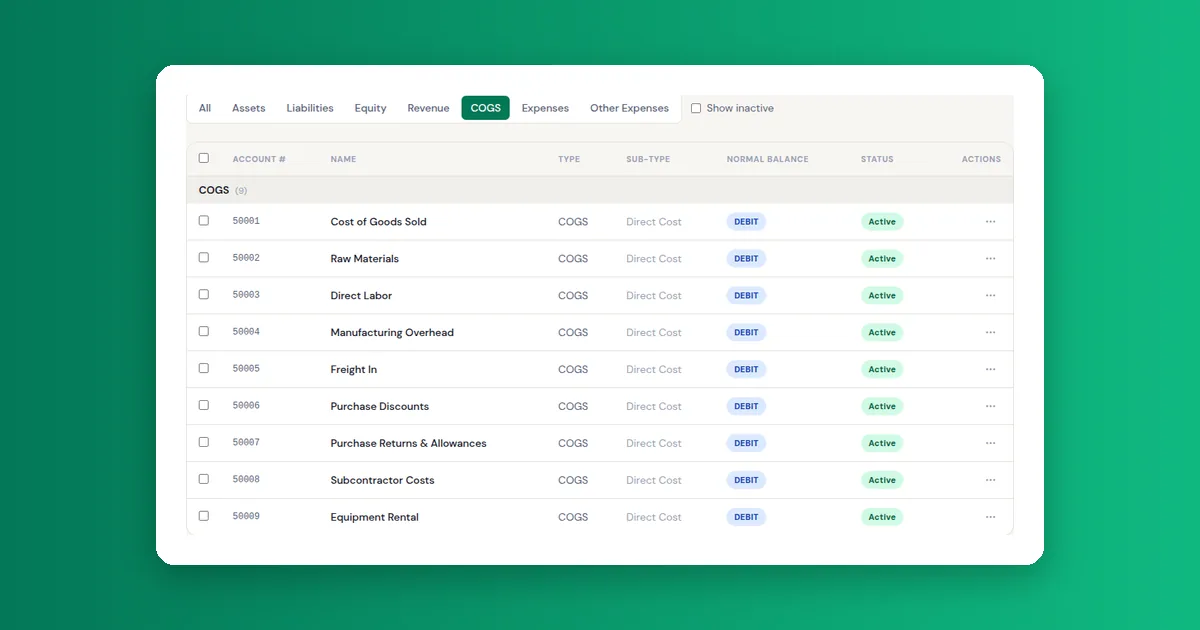
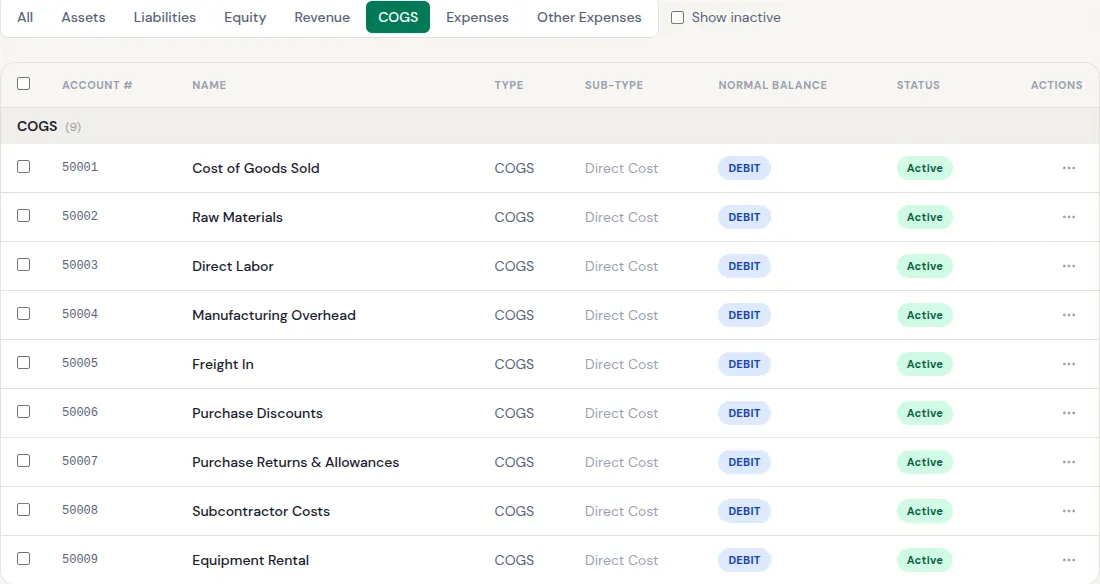
Costs in the right place. The default chart of accounts includes cost-of-goods accounts such as Raw Materials, Direct Labor, Subcontractor Costs and Equipment Rental. You can rename an account or add your own, such as “Parts & Fittings” or “Permits”. Assign each bank and card line to the right one as you go.
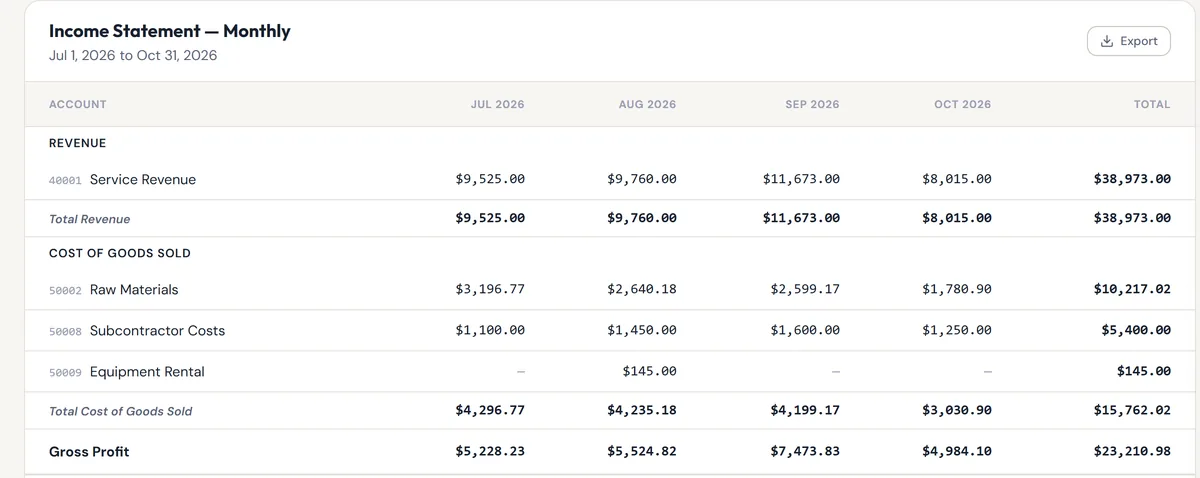
Gross profit, month by month. The Income Statement shows revenue, cost of goods sold and gross profit, with a month-by-month view. If your job sheets say margins are 35% and the Income Statement says 24%, something is missing from the sheets. That check is the most useful one in this whole post.
Subs tracked for 1099s. With Vendor Payments & 1099s switched on in simpleWhirks Hub, you can mark subs as 1099 vendors and see what you paid each one.
What it doesn’t do: no job or class field on transactions, no per-job profit report, no inventory tracking for truck stock, and no payroll. Export your reports to Excel, CSV or PDF and keep the job sheets alongside. Bookkeeping basics covers the rest of the setup.
About the author
Garrett Truman is a licensed Florida CPA (License #AC45159) and co-founder of simpleWhirks. He has spent over twenty years working with small businesses in finance and accounting roles, mostly trades, home-based businesses and owner-operators in Northeast Florida. More from Garrett.
This post is general information, not tax advice for your situation. Inventory methods and sales tax treatment depend on your facts. Talk to your CPA before you change how you book parts or labor.
Frequently asked questions
Defined Terms
- Job costing
- Tracking the actual costs of each job against its price and estimate.
- Direct costs
- Costs you only have because of a specific job: parts, labor on the job, subcontractors, permits, disposal.
- Loaded labor rate
- An hour of labor's true cost: wage plus payroll taxes, workers' comp and benefits, divided by billable hours.
- Gross profit
- Price minus direct costs. On your Income Statement it's revenue minus cost of goods sold.
- Cost of goods sold (COGS)
- The direct costs of the work you sold, such as materials and job labor, reported in Part III of Schedule C.
- Truck stock
- Parts and fittings you carry on the van and use across many jobs.
Sources Cited
- IRS, Publication 334, Tax Guide for Small Business (2025)
- IRS, Schedule C (Form 1040) and Instructions for Schedule C
- Florida Department of Revenue, Rule 12A-1.051, F.A.C.
- Nebraska Business Development Center, University of Nebraska Omaha, How to increase profits using more accurate job costing
Related reading
Markup vs Margin: How to Price a Job That Pays You
A 20% markup isn't a 20% margin, and the gap is where profit goes missing. Here's the simple conversion, a cheat-sheet table, and how to price jobs right.
Books · FL LocalFlorida Sales Tax for Home Service Businesses (What You Must Collect)
Most Florida home service work isn't taxable, but a handful of trades collect sales tax on labor. A CPA's guide to who owes, who doesn't, and the DR-15.
Books · Bookkeeping BasicsBookkeeping Basics for Non-Accountants
A plain-English bookkeeping primer for owner-operators. The five terms, three reports, and one daily habit that cover 90% of what you actually need.