Monthly Bookkeeping Checklist: A 30-Minute Close
Every April I meet the same person. Different business, different shoebox, same face. They’ve lost a weekend, sometimes two, catching up on twelve months of bank statements so I can do their taxes, and somewhere around the third coffee they’ve decided bookkeeping is a punishment.
It isn’t. It’s just that twelve months of it at once is a punishment. Thirty minutes a month is closer to doing the dishes: nobody’s favorite, nobody’s crisis.
Short answer: a monthly close has five steps. Import every statement, categorize the strays, check each account against the bank, follow up on open invoices and bills, then read the P&L and lock the month. Here’s each one, what usually goes sideways, and the easy fix.
Why bother closing the books every month?
Because small and often is cheaper than big and rare, in time, in money and in mood.
When a month’s transactions are fresh, you know what “AMZN MKTP 8812” was. Three months later you’re guessing, and guesses become miscategorized expenses, which become either a bigger tax bill or an awkward conversation with your CPA. A monthly close also gives you a real number to look at: was October actually good, or did it just feel busy?
And here’s the part owners like best: when your books arrive at tax time already closed month by month, the CPA review is short. Short reviews are billed as short reviews.
Step 1: Have you brought in every bank and card statement?
Start by getting every account’s transactions into your books, and only then start sorting.
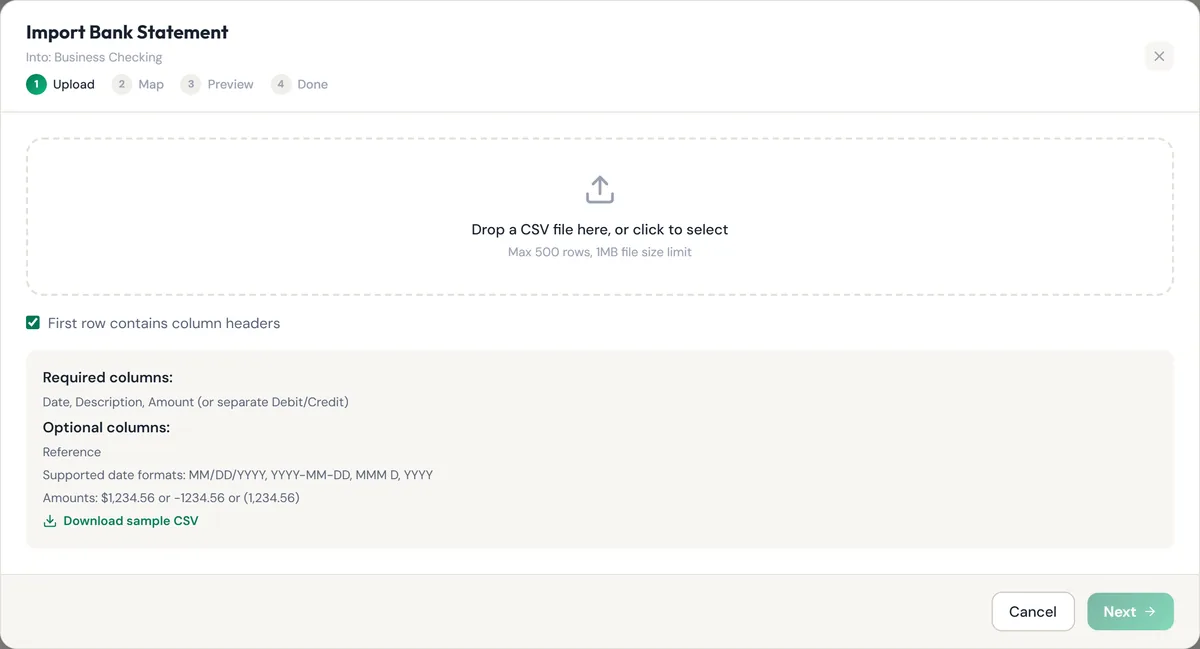
The common snag is the “I’ll do it later” account: the gas card, the second checking account, the PayPal balance. Those are exactly the ones that hide expenses. The fix is a five-minute habit: when the statement lands, download it as a CSV and import it the same day. Most banks offer CSV downloads under statements or account activity.
Step 2: What do you do with the “uncategorized” pile?
Give every line an account while you still remember what it was. It takes seconds per line in week one and minutes per line in month three.
For the ones you really can’t place, ask rather than guess. Check the receipt, the email confirmation, or ask whoever used the card. If it still won’t come to you, park it in a holding account and flag it for your CPA. One thing not to do: drop mystery charges into Owner’s Draw just to make them disappear. That hides a possible deduction and muddies what you actually took out of the business.
Step 3: Does each register match the bank’s ending balance?
Each account’s balance in your books should equal the ending balance on the bank’s statement for the same day. If it does, you’re done with this step in ten seconds.
If it’s off, don’t panic, and don’t go line by line from the top. It’s almost always one of three things:
- A missing day. The import ended on the 30th and the statement ended on the 31st. Look at the last few days first.
- A duplicate. You imported a week twice, or entered a deposit by hand and then imported it. Look for two identical amounts on the same date.
- A one-sided transfer. You moved money from checking to savings and only one account knows. The difference will be exactly the transfer amount.
If the gap matches one transaction to the penny, search for that amount. It’s there.
Step 4: Who still owes you, and who do you owe?
Spend five minutes on open invoices and unpaid bills, and send one friendly follow-up for anything overdue.
This is the step that pays for the whole routine. An invoice that’s 10 days late gets paid after a polite nudge; one that’s 90 days late becomes a write-off conversation. It’s also when you notice a bill you forgot to pay before it grows a late fee. If you track who you’ve paid for 1099 purposes, this is a good moment to glance at it too; our guide to 1099 filing explains why the annual total per vendor matters.
Step 5: Does the P&L look like your month felt?
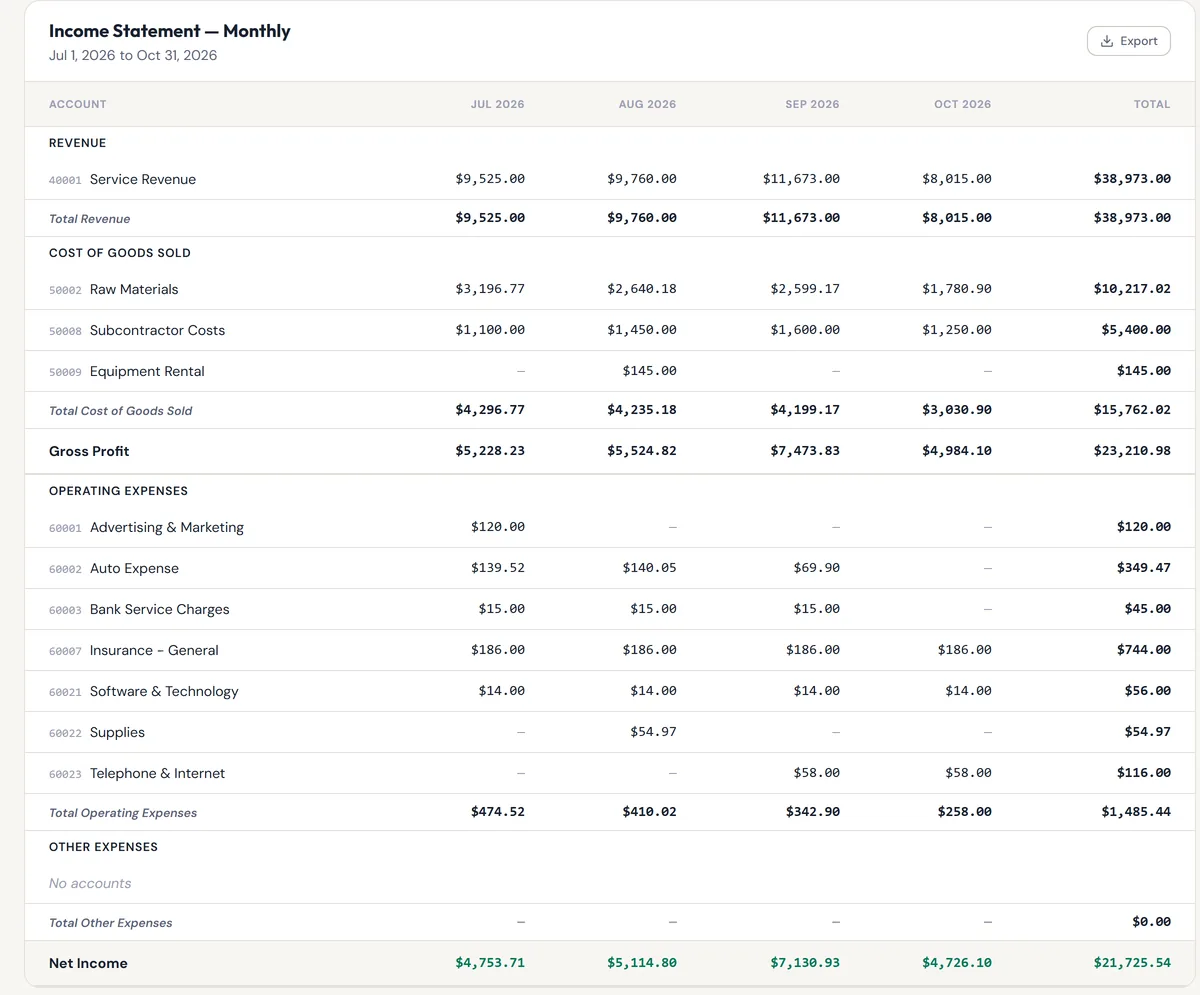
Open the profit and loss statement and compare this month with last month. Any line that doubled, halved or vanished gets a second look.
You’re not auditing. You’re sanity-checking. If materials jumped from $1,800 to $3,600, was that a big job, or did a supplier charge get imported twice? If revenue looks thin, is a deposit sitting uncategorized from Step 2? A monthly view makes the odd month stand out on its own.
Then lock the month. Locking means nobody can add, edit or void anything dated in it by accident, which matters the first time someone “fixes” a June transaction in November.
The 30-minute checklist
| Step | What to do | About how long | Done when… |
|---|---|---|---|
| 1. Import | Download and import each account’s statement | 5 min | Every account has the full month |
| 2. Categorize | Give every Draft line an account | 10 min | No uncategorized lines left |
| 3. Match | Compare each register with the statement’s ending balance | 5 min | Every account agrees with the bank |
| 4. Open items | Review open invoices and bills, send follow-ups | 5 min | Every overdue item has been nudged |
| 5. Review and lock | Read the P&L against last month, then lock the month | 5 min | The month is closed |
What if you’re already months behind?
Start with getting all of the transactions recorded, then go back and start reconciling each month, oldest first, using the same five steps.
Catching up feels enormous because it’s shapeless. The checklist gives it a shape: one month, five steps, done, next month. If it’s a whole year, our mid-year bookkeeping cleanup guide walks through the catch-up in order. And if you’re starting from zero, the bookkeeping basics cover the categories and accounts you’ll need first.
How simpleWhirks Books handles the monthly close
Books was built around exactly this routine, and here’s how each step works today.
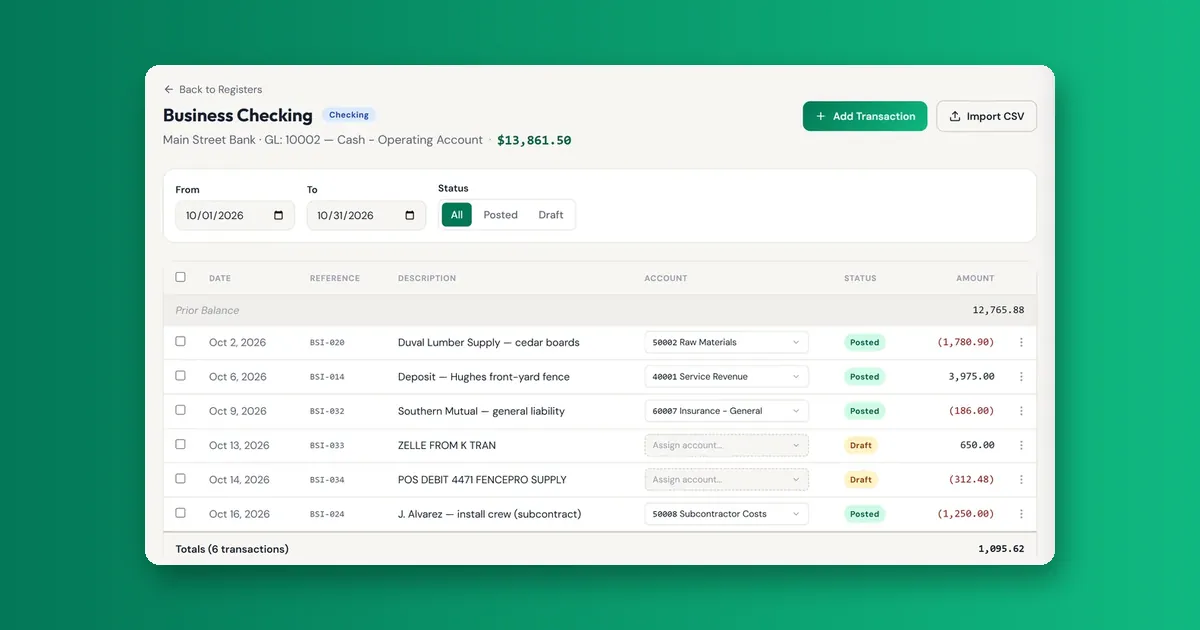
Import. Each bank or card account has its own register. Import CSV takes the bank’s file (date, description and amount, or separate debit and credit columns) and brings the lines in. There are no live bank feeds; you import statement files, which also means you decide when the month is complete.
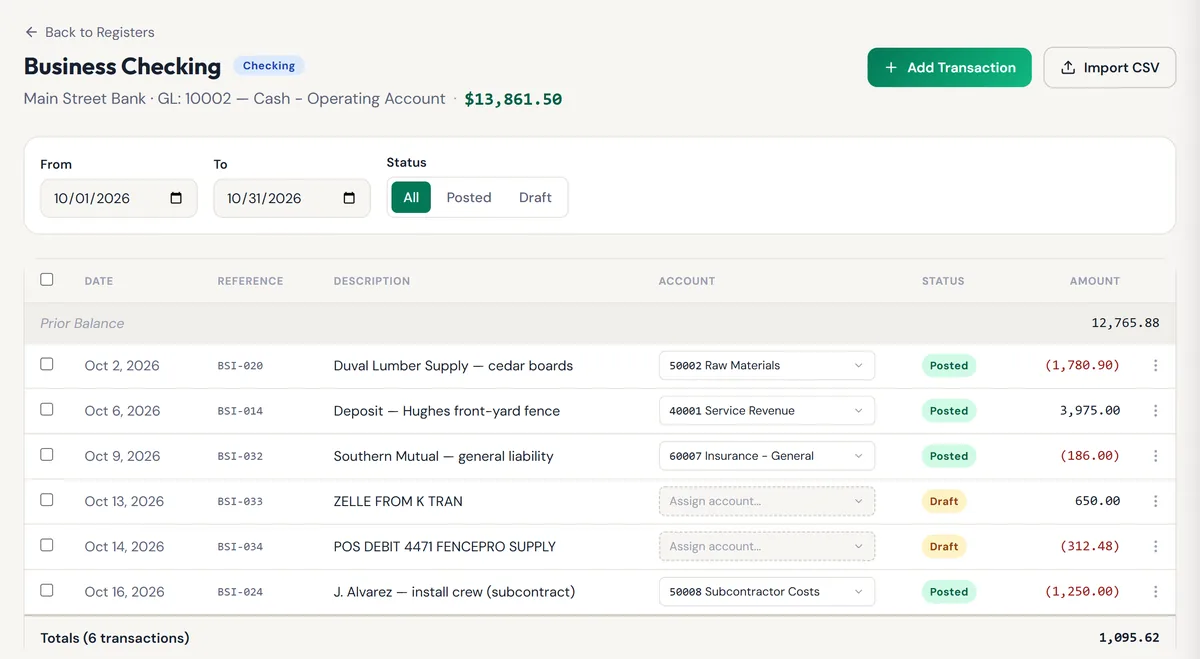
Categorize. Imported lines without an account show as Draft with an “Assign account…” picker right on the register row. Pick one and the line posts. The default chart of accounts includes the everyday ones, plus Owner’s Capital and Owner’s Draw for money moving between you and the business.
Match. The register shows its balance at the top. Filter it to the month and a Prior Balance row appears, so you can compare where the month started and ended with the statement. There isn’t a tick-box reconcile screen; you compare the balance with the statement yourself.
Open items. If you use invoicing in Books, the invoice list shows what’s sent, partly paid and overdue, and AR Reports has an aging summary by customer.
Review and lock. The Income Statement has a Monthly view, so October sits next to September. Under Settings → Organization, Books Closed Through locks every entry on or before the date you choose. Need to fix something? Reopen, correct it, close again.
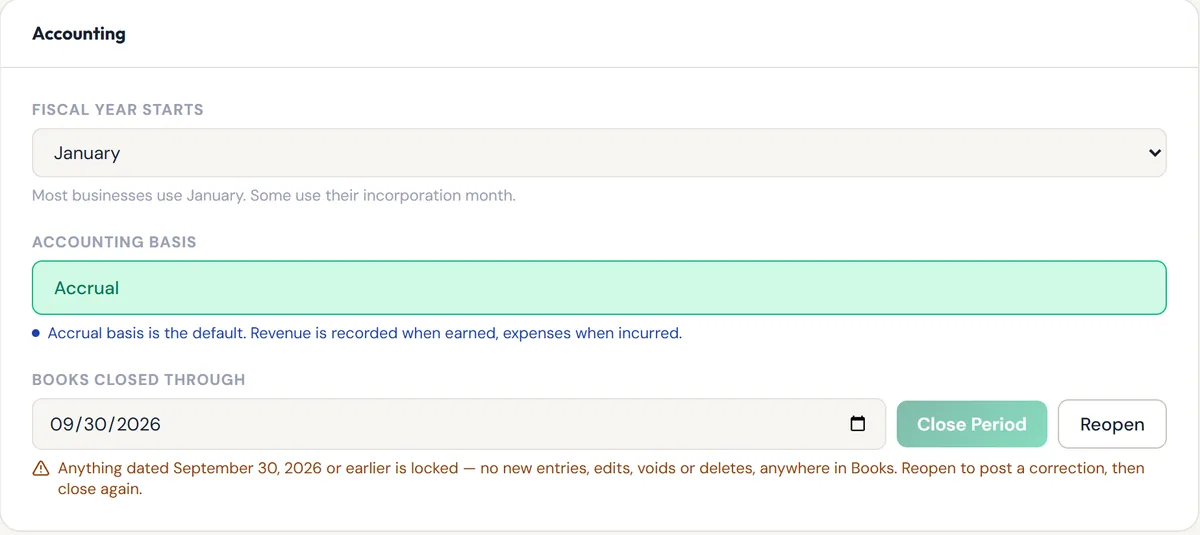
What Books doesn’t do, plainly: it doesn’t pull transactions from your bank automatically, and it doesn’t run payroll. Everything else on this checklist happens in one place.
About the author. Garrett Truman is a Florida CPA (license #AC45159) and virtual CFO who has spent fifteen years helping small businesses get their books into shape, and slightly fewer years trying to stop them saving it all for April. More from Garrett.
Sources cited: IRS, Publication 583, Starting a Business and Keeping Records · U.S. Small Business Administration, Manage your finances
Frequently asked questions
Defined Terms
- Month-end close
- The short routine of making a month's numbers complete and correct, then locking them so they stay that way.
- Bank reconciliation
- Checking that your books agree with the bank's statement for the same period, and explaining any difference.
- Uncategorized transaction
- A line that came in from the bank but hasn't been assigned to an account yet. In Books it shows as a Draft until you pick one.
- Closed-through date
- The date on or before which your books are locked. Nothing dated earlier can be added, edited or voided until you move it.
- Ending balance
- What the bank says the account held on the last day of the statement. The number your register should agree with.
Related reading
The Mid-Year Bookkeeping Cleanup Guide
Five-day mid-year cleanup sequence for home-based and small-service businesses behind on the books — get current before Q2 estimated taxes hit June 15.
Books · Bookkeeping BasicsBookkeeping Basics for Non-Accountants
A plain-English bookkeeping primer for owner-operators. The five terms, three reports, and one daily habit that cover 90% of what you actually need.
Books · Bookkeeping BasicsHow to Separate Business and Personal Finances
Mixed business and personal money? Very normal, very fixable. How to split the accounts, pay yourself properly, and record the personal coffee on the business card.